
• Inscripciones
  • Estudiantes
  • Egresados
  • Docentes
  • Administrativos
  • Transparencia
  • Participa
  • Atenciรณn al ciudadano
  • Sede
  • Gov.co
logo Unicesar
  • LA UNIVERSIDAD
  • OFERTA ACADร‰MICA
  • INVESTIGACIร“N
  • PROYECCIร“N SOCIAL
  • INTERNACIONALIZACIร“N
  • SERVICIOS
escudo Colombia
  • La universidad
  • Oferta Acadรฉmica
    • Pregrado
    • Postgrado
    • Educaciรณn Continua
    • Preuniversitario
  • Investigaciรณn
  • Extensiรณn
    • Docencia y Servicio
    • Emprendimiento
    • Consultorio Jurรญdico
    • Cempre
  • Internacionalizaciรณn
  • Inscripciones
  • Estudiantes
  • Egresados
  • Docentes
  • Administrativos
  • Transparencia
  • Participa
  • Atenciรณn al ciudadano
  • Sede
  • Gov.co
  • SERVICIOS
    • Vortal
    • Correo Institucional
    • SGD – Orfeo
    • Campus virtual
    • Bibliotecas
    • Portal de contrataciรณn
    • Emisora UPC radio
    • Software Acadรฉmico
    • Bienestar Institucional
    • Repositorio Institucional
    • Editorial
    • Catalogo revistas
    • Generador de facturas y pago en lรญnea

EVENTOS UNICESAR

No Post Found

OCTUBRE

No Post Found

EVENTOS FINALIZADOS

CURSOS DE INGLES

CURSOS DE INGLES

CONVOCATORIAS INTERNAS DE FINANCIACIร“N DE PROYECTOS DE INVESTIGACIร“N 2023

CONVOCATORIAS INTERNAS DE FINANCIACIร“N DE PROYECTOS DE INVESTIGACIร“N 2023

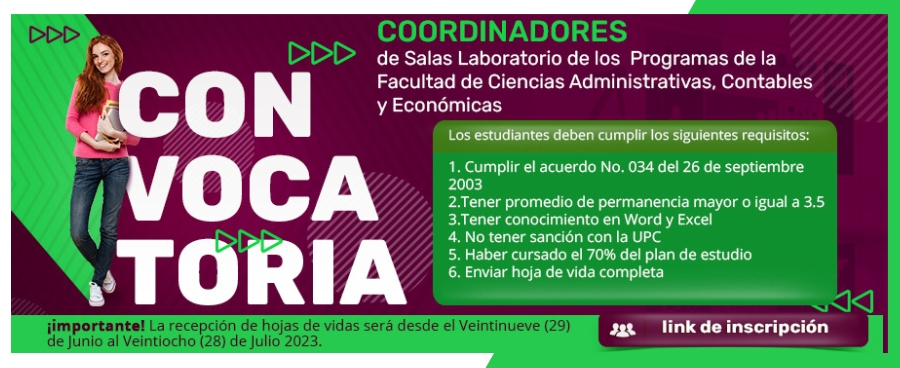
CONVOCATORIAS PARA COORDINADORES DE LAS SALAS DE LABORATORIO DE LOS PROGRAMAS FACE

CONVOCATORIAS PARA COORDINADORES DE LAS SALAS DE LABORATORIO DE LOS PROGRAMAS FACE

  • Previous
  • 1
  • …
  • 47
  • …
  • 48

Universidad Popular del Cesar

PQRS

Derechos Acadรฉmicos

Mapa del Sitio

Preguntas Frecuentes

Notificaciones Judiciales:
notificacionesjudiciales@unicesar.edu.co

E-mail: pqrs@unicesar.edu.co

Contรกctenos:

Sede Administrativa
Horario de Atenciรณn Presencial:
Lunes a Viernes de 8:00 a.m. – 12:00 m. y 2:00 p.m. – 6:00 p.m.
Balneario Hurtado, Via a Patillal
Valledupar – Cesar, Colombia

Telรฉfono conmutador PBX: (+57 605 573 2809)
Lรญnea de servicio a la ciudadanรญa: (+57 605 573 2809)
Lรญnea Anticorrupciรณn: (+57 605 573 2809) Ext: 1010
Correo Anticorrupciรณn: controlinternodisciplinario@unicesar.edu.co

Instructivo Anticorrupciรณn

Canales fรญsicos y electrรณnicos para atenciรณn al pรบblico

Condiciones de Uso y Polรญticas

Acerca de este sitio web

Universidad Popular del Cesar
ยฉ Copyright 2026

Logo enamorate del cesar
  • Seguir
  • Seguir
  • Seguir
  • Seguir

Instituciรณn de Educaciรณn Superior sujeta a inspecciรณn y vigilancia por el Ministerio de Educaciรณn Nacional – Cรณdigo SNIES 1120

Accesibilidad
Modos de accesibilidad
Modo seguro de epilepsia
Humedece el color y elimina los parpadeos.
Este modo permite a las personas con epilepsia utilizar el sitio web de forma segura al eliminar el riesgo de convulsiones que resultan de las animaciones intermitentes o parpadeantes y las combinaciones de colores arriesgadas.
Modo para personas con discapacidad visual
Mejora las imรกgenes del sitio web.
Este modo ajusta el sitio web para la comodidad de los usuarios con discapacidades visuales, como visiรณn degradada, visiรณn de tรบnel, cataratas, glaucoma y otras.
Modo de discapacidad cognitiva
Ayuda a concentrarse en contenido especรญfico.
Este modo brinda diferentes opciones de asistencia para ayudar a los usuarios con deficiencias cognitivas, como dislexia, autismo, CVA y otras, a concentrarse mรกs fรกcilmente en los elementos esenciales del sitio web.
Modo compatible con TDAH
Reduce las distracciones y mejora el enfoque.
Este modo ayuda a los usuarios con TDAH y trastornos del desarrollo neurolรณgico a leer, navegar y concentrarse en los elementos principales del sitio web con mayor facilidad, al tiempo que reduce significativamente las distracciones.
Modo de ceguera
Permite usar el sitio con su lector de pantalla
Este modo configura el sitio web para que sea compatible con lectores de pantalla como JAWS, NVDA, VoiceOver y TalkBack. Un lector de pantalla es un software para usuarios ciegos que se instala en una computadora y un telรฉfono inteligente, y los sitios web deben ser compatibles con รฉl.
Diccionario en lรญnea
    Experiencia legible
    Escalado de contenido
    Por defecto
    Lupa de texto
    Fuente legible
    Apto para dislexia
    Destacar tรญtulos
    Destacar enlaces
    Tamaรฑo de fuente
    Por defecto
    Altura de la lรญnea
    Por defecto
    Espaciado de letras
    Por defecto
    Alineado a la izquierda
    Centro alineado
    Alineado a la derecha
    Experiencia visualmente agradable
    Contraste oscuro
    Contraste de luz
    Monocromo
    Alto contraste
    Alta saturaciรณn
    Baja saturaciรณn
    Ajustar colores de texto
    Ajustar los colores del tรญtulo
    Ajustar los colores de fondo
    Orientaciรณn Fรกcil
    Silenciar sonidos
    Ocultar imรกgenes
    Ocultar emoji
    Guรญa de lectura
    Detener animaciones
    Mรกscara de lectura
    Resaltar pasar el cursor
    Resalte el enfoque
    Gran cursor oscuro
    Cursor de luz grande
    Lectura cognitiva
    Teclado virtual
    Teclas de navegaciรณn
    Navegaciรณn por voz

    unicesar.edu.co

    Accessibility Statement

    • www.unicesar.edu.co
    • octubre 16, 2026

    Compliance status

    We firmly believe that the internet should be available and accessible to anyone, and are committed to providing a website that is accessible to the widest possible audience, regardless of circumstance and ability.

    To fulfill this, we aim to adhere as strictly as possible to the World Wide Web Consortiumโ€™s (W3C) Web Content Accessibility Guidelines 2.1 (WCAG 2.1) at the AA level. These guidelines explain how to make web content accessible to people with a wide array of disabilities. Complying with those guidelines helps us ensure that the website is accessible to all people: blind people, people with motor impairments, visual impairment, cognitive disabilities, and more.

    This website utilizes various technologies that are meant to make it as accessible as possible at all times. We utilize an accessibility interface that allows persons with specific disabilities to adjust the websiteโ€™s UI (user interface) and design it to their personal needs.

    Additionally, the website utilizes an AI-based application that runs in the background and optimizes its accessibility level constantly. This application remediates the websiteโ€™s HTML, adapts Its functionality and behavior for screen-readers used by the blind users, and for keyboard functions used by individuals with motor impairments.

    If youโ€™ve found a malfunction or have ideas for improvement, weโ€™ll be happy to hear from you. You can reach out to the websiteโ€™s operators by using the following email

    Screen-reader and keyboard navigation

    Our website implements the ARIA attributes (Accessible Rich Internet Applications) technique, alongside various different behavioral changes, to ensure blind users visiting with screen-readers are able to read, comprehend, and enjoy the websiteโ€™s functions. As soon as a user with a screen-reader enters your site, they immediately receive a prompt to enter the Screen-Reader Profile so they can browse and operate your site effectively. Hereโ€™s how our website covers some of the most important screen-reader requirements, alongside console screenshots of code examples:

    1. Screen-reader optimization: we run a background process that learns the websiteโ€™s components from top to bottom, to ensure ongoing compliance even when updating the website. In this process, we provide screen-readers with meaningful data using the ARIA set of attributes. For example, we provide accurate form labels; descriptions for actionable icons (social media icons, search icons, cart icons, etc.); validation guidance for form inputs; element roles such as buttons, menus, modal dialogues (popups), and others. Additionally, the background process scans all the websiteโ€™s images and provides an accurate and meaningful image-object-recognition-based description as an ALT (alternate text) tag for images that are not described. It will also extract texts that are embedded within the image, using an OCR (optical character recognition) technology. To turn on screen-reader adjustments at any time, users need only to press the Alt+1 keyboard combination. Screen-reader users also get automatic announcements to turn the Screen-reader mode on as soon as they enter the website.

      These adjustments are compatible with all popular screen readers, including JAWS and NVDA.

    2. Keyboard navigation optimization: The background process also adjusts the websiteโ€™s HTML, and adds various behaviors using JavaScript code to make the website operable by the keyboard. This includes the ability to navigate the website using the Tab and Shift+Tab keys, operate dropdowns with the arrow keys, close them with Esc, trigger buttons and links using the Enter key, navigate between radio and checkbox elements using the arrow keys, and fill them in with the Spacebar or Enter key.Additionally, keyboard users will find quick-navigation and content-skip menus, available at any time by clicking Alt+1, or as the first elements of the site while navigating with the keyboard. The background process also handles triggered popups by moving the keyboard focus towards them as soon as they appear, and not allow the focus drift outside it.

      Users can also use shortcuts such as โ€œMโ€ (menus), โ€œHโ€ (headings), โ€œFโ€ (forms), โ€œBโ€ (buttons), and โ€œGโ€ (graphics) to jump to specific elements.

    Disability profiles supported in our website

    • Epilepsy Safe Mode: this profile enables people with epilepsy to use the website safely by eliminating the risk of seizures that result from flashing or blinking animations and risky color combinations.
    • Visually Impaired Mode: this mode adjusts the website for the convenience of users with visual impairments such as Degrading Eyesight, Tunnel Vision, Cataract, Glaucoma, and others.
    • Cognitive Disability Mode: this mode provides different assistive options to help users with cognitive impairments such as Dyslexia, Autism, CVA, and others, to focus on the essential elements of the website more easily.
    • ADHD Friendly Mode: this mode helps users with ADHD and Neurodevelopmental disorders to read, browse, and focus on the main website elements more easily while significantly reducing distractions.
    • Blindness Mode: this mode configures the website to be compatible with screen-readers such as JAWS, NVDA, VoiceOver, and TalkBack. A screen-reader is software for blind users that is installed on a computer and smartphone, and websites must be compatible with it.
    • Keyboard Navigation Profile (Motor-Impaired): this profile enables motor-impaired persons to operate the website using the keyboard Tab, Shift+Tab, and the Enter keys. Users can also use shortcuts such as โ€œMโ€ (menus), โ€œHโ€ (headings), โ€œFโ€ (forms), โ€œBโ€ (buttons), and โ€œGโ€ (graphics) to jump to specific elements.

    Additional UI, design, and readability adjustments

    1. Font adjustments โ€“ users, can increase and decrease its size, change its family (type), adjust the spacing, alignment, line height, and more.
    2. Color adjustments โ€“ users can select various color contrast profiles such as light, dark, inverted, and monochrome. Additionally, users can swap color schemes of titles, texts, and backgrounds, with over seven different coloring options.
    3. Animations โ€“ person with epilepsy can stop all running animations with the click of a button. Animations controlled by the interface include videos, GIFs, and CSS flashing transitions.
    4. Content highlighting โ€“ users can choose to emphasize important elements such as links and titles. They can also choose to highlight focused or hovered elements only.
    5. Audio muting โ€“ users with hearing devices may experience headaches or other issues due to automatic audio playing. This option lets users mute the entire website instantly.
    6. Cognitive disorders โ€“ we utilize a search engine that is linked to Wikipedia and Wiktionary, allowing people with cognitive disorders to decipher meanings of phrases, initials, slang, and others.
    7. Additional functions โ€“ we provide users the option to change cursor color and size, use a printing mode, enable a virtual keyboard, and many other functions.

    Browser and assistive technology compatibility

    We aim to support the widest array of browsers and assistive technologies as possible, so our users can choose the best fitting tools for them, with as few limitations as possible. Therefore, we have worked very hard to be able to support all major systems that comprise over 95% of the user market share including Google Chrome, Mozilla Firefox, Apple Safari, Opera and Microsoft Edge, JAWS and NVDA (screen readers).

    Notes, comments, and feedback

    Despite our very best efforts to allow anybody to adjust the website to their needs. There may still be pages or sections that are not fully accessible, are in the process of becoming accessible, or are lacking an adequate technological solution to make them accessible. Still, we are continually improving our accessibility, adding, updating and improving its options and features, and developing and adopting new technologies. All this is meant to reach the optimal level of accessibility, following technological advancements. For any assistance, please reach out to

    PROYECCIร“N SOCIAL

    ๏ƒ€

    PRรCTICAS INSTITUCIONALES

    ๏’น

    EMPRENDIMIENTO

    ๏‰Ž

    CONSULTORIO JURรDICO

    ๏”…

    CEMPRE

    ๎‚

    ENAMร“RATE DEL CESAR

    INTERNACIONALIZACIร“N

    ๏•ฝ

    INTERNACIONALIZACIร“N

    La Universidad Popular del Cesar concibe la internacionalizaciรณn como un proceso que abre espacios para que la comunidad universitaria genere competencias internacionales y globales, con el fin de potencializar la formaciรณn de personas รญntegras, con excelencia acadรฉmica.

    INVESTIGACIร“N

    ๏ƒซ

    Vicerrectorรญa de Investigaciones

    La Vicerrectorรญa de Investigaciones se constituyรณ como ente rector responsable de diseรฑar, promover y ejecutar las polรญticas de investigaciรณn de la instituciรณn, con el objetivo fundamental de generar un impacto positivo sobre la regiรณn.

    OFERTA ACADร‰MICA

    ๏—š

    PREGRADO

    ๏”

    POSTGRADO

    ๎™

    EDUCACIร“N CONTINUA

    ๏“ฟ

    PREUNIVERSITARIOS

    ๏•ฐ

    SABER PRO

    SERVICIOS

    ๏™ด

    Vortal

    ๏™˜

    correo institucional

    ๏Šป

    sgd - orfeo

    ๎ฆ

    CAMPUS VIRTUAL

    ๏—š

    BIBLIOTECAS

    ๏‘จ

    PORTAL DE CONTRATACIร“N

    ๏‘Ÿ

    BIENESTAR UNIVERSITARIO

    ๏€

    EMISORA RADIO - UPC

    ๏ฉ

    SOFTWARE ACADร‰MICO

    ๏ผ

    REPOSITORIO INSTITUCIONAL

    ๏€ญ

    EDITORIAL

    ๏•ฐ

    CATALOGO DE REVISTAS

    ๏‡ช

    PORTAL DE NOTICIAS

    ๏•ฑ

    GENERADOR DE FACTURAS Y PAGO EN LรNEA

    LA UNIVERSIDAD

    ๎ฅ

    La Universidad

    ๏šง

    Nuestra Historia

    ๏‚…

    Principios y Objetivos

    ๏“„

    Valores Institucionales

    ๏ญ

    Sรญmbolos Institucionales

    ๏”…

    Identidad Institucional

    ๏ƒจ

    Estructura Organizacional

    ๏‚ฑ

    Sistema de Gestiรณn Institucional

    ๏‚ฑ

    Subsistema SG-SST

    ๎ƒฐ

    Oficina de Control Interno

    ๎™

    Oficina de Control Disciplinado

    ๎ƒฒ

    Oficina de Planeaciรณn

    ๏€ญ

    Oficina Jurรญdica

    ๏—ผ

    Oficina de Informatica y sistemas